The Labour Cost Control Sheet
Four ways to spot labour-cost drift sooner,
reduce admin and make every shift count
Small issues. Big impact.
- Extra hours
- Unexpected overtime
- Missed breaks
- Manual corrections

Control labour costs at every stage
From building the roster to reviewing the results, these four steps help you spot cost drift early and act before it adds up.

1. Plan
See the likely roster cost before publishing

2. Track hours
Record reliable hours as work happens

3. Review
Focus only on timehseets records that need attention

4. Act
Use live insights to improve the next shift
1. Plan labour costs
The Labour Cost Drain
Rosters are built around coverage, but the true wage impact can stay hidden until the week is already underway.
What better looks like
Managers can compare planned labour with budget and demand before the roster goes live, and make a better staffing call while there is still time.
How Deputy helps
Four ways to plan labour with cost in mind:
- Live roster costs — See expected wage costs as you build your roster, so you can adjust before it goes live, not after the money is spent.
- Labour budgets — Set budgets and compare them with planned roster costs. Managers can quickly see when a roster is heading over budget and adjust coverage earlier.
- Sales & demand data — Use sales forecasts and demand data to match staffing to busy and quiet periods, helping you avoid overstaffing and understaffing.
- Overtime warnings — Spot potential overtime while rostering, before extra hours become an unexpected cost. Managers can adjust shifts or share hours more effectively.
2. Track hours accurately
The Labour Cost Drain
Missed clock-ins, forgotten clock-outs and inconsistent break records create corrections, payroll risk and labour data nobody fully trusts.
What better looks like
Each team records time in a way that fits how they work, with sensible location controls and fewer gaps for managers to fix later.
How Deputy helps
Four ways to accurately track hours:
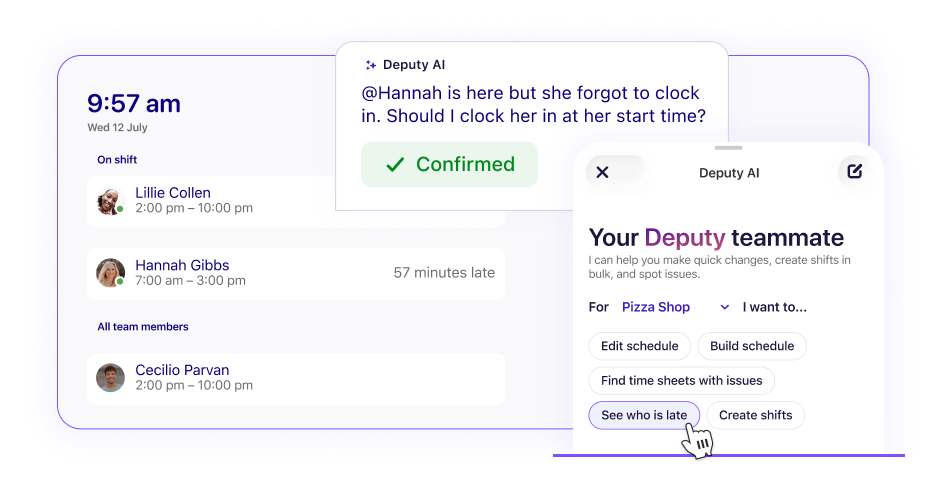
- Workplace time clock — Employees clock in and out from a shared device or their phones, with facial verification helping confirm their identity. Managers can see who has started, is late or is on a break.
- Location controls — to confirm employees are at the correct workplace when clocking in, giving managers greater visibility and more accurate time records
- Automated time capture — When employees clock out, Deputy automatically creates a timesheet from their hours and breaks, ready for managers to review and approve.
- Break records — Plan and record breaks, and flag those missed or cut short. Managers get a clearer record of breaks and time worked, supporting payroll accuracy and compliance.
TRUSTED BY 390,000+ WORKPLACES ACROSS THE GLOBE


3. Give managers time back
The Labour Drain
Managers spend valuable time checking routine timesheets one by one, even when most match the roster and need no action.
What better looks like
Clean timesheets move through efficiently. Exceptions stay visible, so managers can focus on the missed break, unusual clock-in or overtime that actually needs a decision.
How Deputy helps
Four ways to make timesheet review faster:
- Exception-based review — Deputy flags timesheets with missed breaks, unusual clock-ins or overtime, so managers focus only on records needing attention.
- Flexible time limits — Set acceptable limits for early or late starts, finishes and shift lengths, so small variations don’t create unnecessary admin.
- Auto-approval for clean timesheets — Automatically approve timesheets that match the roster and your rules, while keeping exceptions visible for manager review.
- Comments & audit history — Keep comments, edits and approvals timesheet history, so managers can see what changed, when, and by whom.
4. Act on labour data
The Labour Cost Drain
Reports arrive after the week is over - too late to change the result, or managers must build them manually when they should be running the floor.
What better looks like
Managers can see where labour is moving away from plan, understand why, and receive the right report or alert without hunting for the numbers.
How Deputy helps
Four ways to turn labour data into faster decisions:
- Planned vs actual costs — Compare rostered costs with actuals so managers can spot labour drift before it grows.
- Attendance and absence insights — See lateness, absences and no-shows so managers can identify coverage problems quickly.
- Custom reports and dashboards — Build reports around key metrics, then schedule to send them to the right people.
- Variance alerts — Set key labour alerts, so managers know when costs or hours move off plan.
Can your current process answer these questions?
☐ Can managers see the likely labour cost before publishing a roster?
☐ Can they see where the full week is heading - not just what has happened today?
☐ Are overtime, coverage and timekeeping issues visible early?
☐ Do managers review exceptions rather than every timesheet?
☐ Can they compare labour with sales or demand in one view?
☐ Do the right people receive an alert when labour drifts off plan?
Every ‘no’ is a blind spot where labour costs can creep up. Better visibility helps you act earlier, protect margins and give managers time back.
Stay in control before, during and after every shift


Ready to build more
cost-efficient rosters?
Frequently asked questions
- What is demand forecasting?
Demand forecasting is the process of gathering historical data to estimate expected future customer demand. To businesses, this process helps estimate the proper staff needed to meet future needs while avoiding unnecessary staffing costs.
- What is the benefit of demand forecasting?
Demand forecasting can help management understand the optimal labour force needed to support customer demand at a given time. Benefits also include the ability to prevent staff shortages in rostering, reduce unnecessary labour costs, and scale your optimal roster.
- How can I increase efficiency with demand forecasting?
Because demand forecasting takes into account future staffing needs, it ultimately impacts labour costs. Understanding future demand and adjusting rostering makes for a more efficient and cost-savings rostering process for your business.
- Will I save on labour costs using the Deputy app?
The demand forecasting feature in Deputy will help management teams and leaders lower labour costs and optimise roster coverage by leveraging historical data from your POS and payroll systems. Using one central dashboard, you're able to visualise insights to help make smarter rostering decisions.
- How does employee rostering help scale my business?
Using a platform for employee rostering can provide huge time savings for management teams allowing leaders to address larger business issues or other immediate operational concerns. Using demand-based automation models, you are able to create better rosters that are constantly adapting to changing needs.
- How can I track my employee hours?
Time tracking software and apps offer an easy way to record accurate employee hours. All an employee needs to do is clock in and out of work via a time tracking app on their phone, tablet, or computer. Then the app creates an automatic timesheet with their total hours and breaks. Those timesheets can be verified with a location stamp or a photo to show they clocked in and out of the right location.
- How do I capture an employee’s location?
With time tracking software, an employee can verify their location when they start and end work using a GPS location stamp. You can also see when team members start and end scheduled and unscheduled breaks.
- Can I manage multiple locations with your time tracking software?
Absolutely! You can set up as many locations as you like in Deputy and manage them seamlessly. Whether you need to schedule employees across different stores or approve their timesheets, you can view all your locations in one place and easily filter between them.
When it comes to recording accurate work hours across locations, your staff can use our time tracking app on mobile or tablet — depending on what works best for your business. Using our app on tablet is great if you want employees to clock in and out of work from one fixed location on site. However, if you don’t want to set up a tablet at every one of your locations, staff can simply clock in and out from their own phones and use a GPS location stamp to show they were in the right place. - How does biometric time tracking help reduce buddy punching in shift work?
Buddy punching happens when one employee clocks in on behalf of another. Deputy's facial verification feature helps reduce this risk by requiring employees to verify their identity at the tablet kiosk before a clock-in is recorded.
The system uses liveness detection to help determine whether a real person is present at the device rather than a photo or video. Each verified clock-in is linked to an employee's attendance record, helping businesses maintain reliable time and attendance records.
- Do your time clock apps create automatic timesheets?
Yes. When an employee finishes a shift using Deputy's time clock, a timesheet is created automatically using recorded hours and breaks. Managers can review and approve timesheets before exporting them to payroll software.